
Geometry Dash 2.208+ · Geode SDK · Windows (64-bit)
Record.Replay.Train.
A premium Geometry Dash mod for serious practice - frame-accurate macro recording, deterministic replay, and a full suite of audio/visual training tools, right in the pause menu.
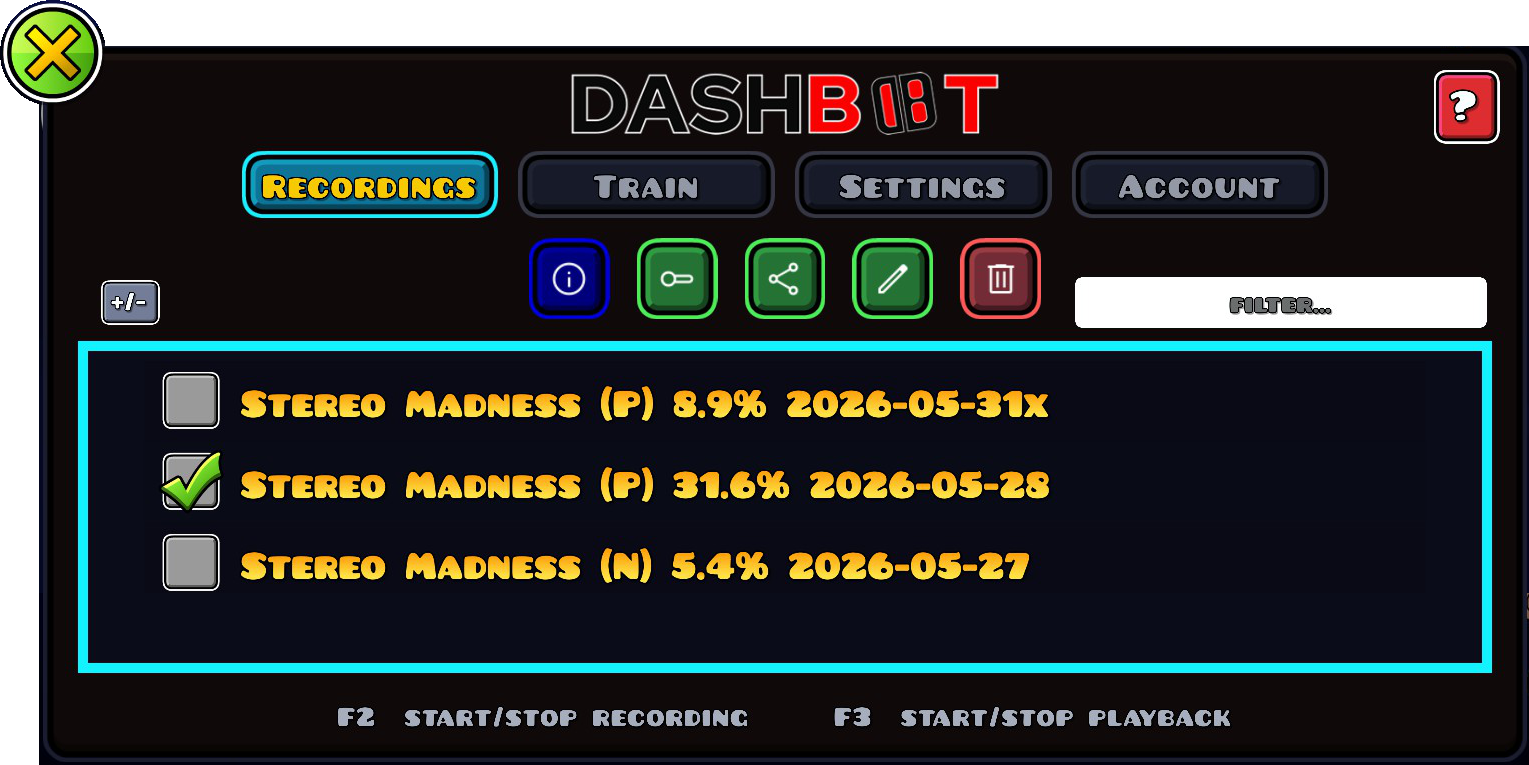
The full toolkit for serious GD practice.
Every feature is built into the pause menu - no overlay, no second window. It sits where you already look.
Frame-accurate recording Basic
Captures every input, with the RNG seed frozen so replays are bit-for-bit deterministic - the same run, every time.
Recording sharing Basic
Send your recordings to other players by simple file copy (Discord, USB). Pro adds one-click cloud sharing.
Playback controls Pro
Fast-forward, rewind, scrub to any percent, and loop a section until you nail it.
Timing trainer Pro
Practise a run's input timing by ear and eye: a metronome sounds each input while on-screen lines show exactly when to click.
Visual overlays Pro
Trajectory path and a death heat map drawn over the level - see your route and exactly where every attempt died.
Splice runs together Pro
Take over from a saved run mid-playback and record the rest, stitching the best parts of multiple attempts into one clean recording.
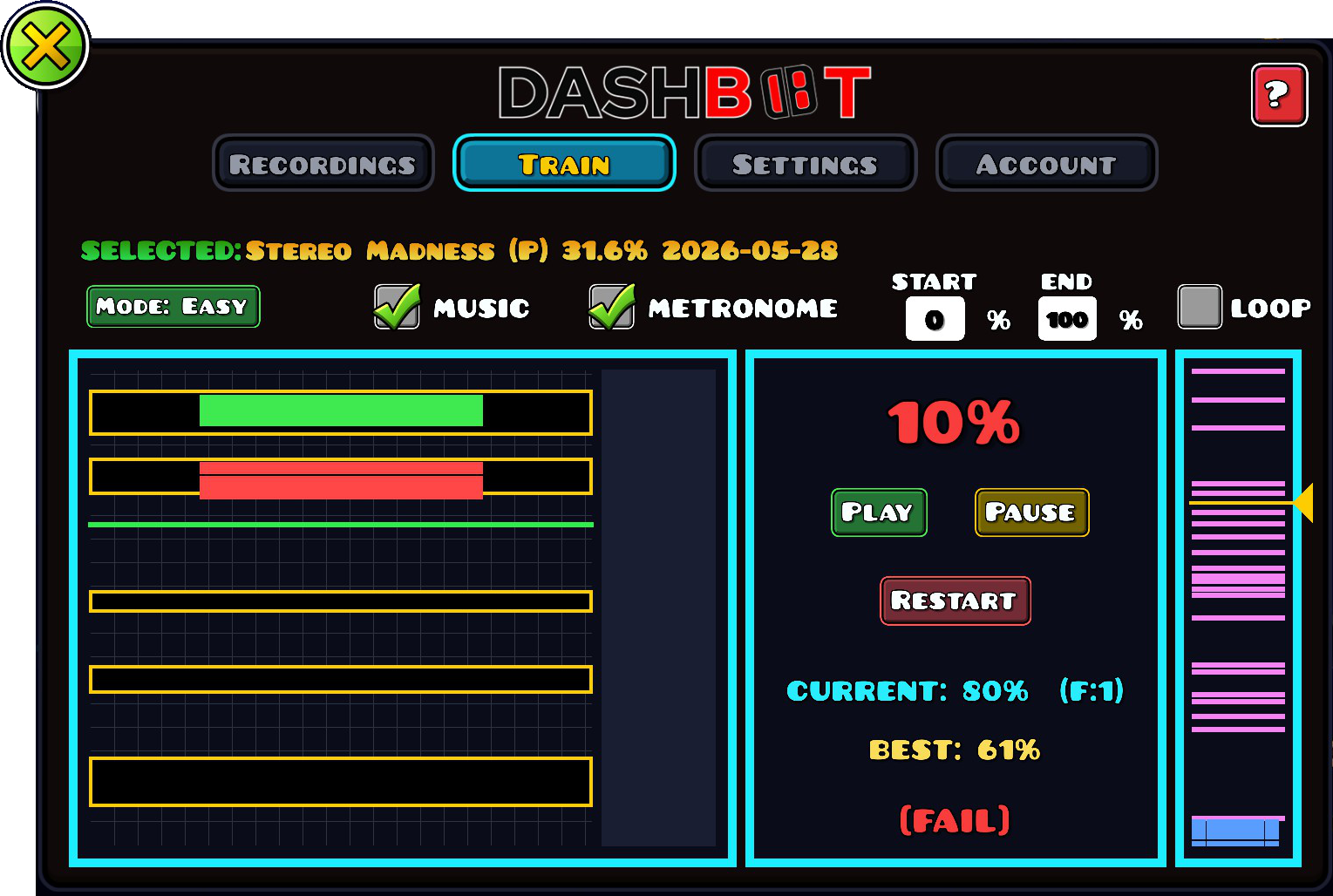
Train your timing, not your luck.
Open the Train tab, pick a recording, and DashBot shows every input you need to hit, scrolling in
time with the song. Hear each one with the metronome, see it coming on screen, and
loop any start → end range until it's muscle memory. Live Pass/Fail scoring tracks your
current and best run.
- EASYGenerous timing window. Get the rhythm into your hands.
- NORMTight window. Train as if you were playing for real.
- HARDObstacles hidden. Train with audio patterns only.
Two ways in.
Own the basics for the price of a coffee, or subscribe for the full training toolkit. Cancel anytime.
Record, replay and share your runs.
- ✓Frame-accurate session recording
- ✓Deterministic replay (frozen RNG seed)
- ✓Unlimited local recording library
- ✓Recording sharing via file transfer
- –Advanced playback controls
- –Audio/visual timing trainer
- –Visual overlays & splicing
The full audio/visual training toolkit.
- ✓Everything in Basic
- ✓One-click cloud sharing
- ✓Advanced playback controls (FF / rewind / scrub / loop)
- ✓Match original recording speed
- ✓Timing trainer - metronome by ear + on-screen click lines
- ✓Visual overlays - trajectory path & death heat map
- ✓Splice runs together (mid-run takeover)
- ✓Every update while subscribed
Prices in USD · VAT added at checkout where applicable · secure checkout by Lemon Squeezy (Merchant of Record).
Three steps. Five minutes.
Install Geode
DashBot runs on the Geode SDK - the open-source mod loader for Geometry Dash 2.208+. Free, ~30-second install.
Add DashBot
Install DashBot from the in-game Geode mod browser, or drop the .geode file into your Geode mods/ folder, then launch the game.
Buy & activate
Pick a tier above. Then click the DashBot (DB) icon on the GD main menu and enter the email you bought with - no key to copy. Unlocks on up to 3 devices you own.
Stuck? Read the DashBot help guide.
Before you buy.
Will DashBot get me banned?+
What platforms are supported?+
How is my licence delivered?+
What happens if I cancel Pro?+
Can I upgrade from Basic to Pro?+
Can I share my recordings?+
What's your refund policy?+
Who builds DashBot?+
Stop guessing. Start training.
Install from Geode, pick a tier, and activate with your purchase email. Five minutes from checkout to your first deterministic replay.
Get DashBot - from $3.99 →